

ALI SEA Laptop Screen Extender 15.6”, Portable Triple Monitor for Laptop up to 17.3″ with FHD 1080P IPS Display, Laptop Monitor Extender for Travel Plug-Play Compatible with Mac, Wins, Chrome
Original price was: $399.99.$299.99Current price is: $299.99.




Price: $399.99 - $299.99
(as of Mar 21, 2025 22:45:08 UTC – Details)
Product Description

Laptop Screen Extender
Increase efficiency up to 300% and save time

Provide you with a bright, vivid, immersive viewing experience

1 300% Efficient Work 2 15.6 Inch 1080P 3 Plug-Play


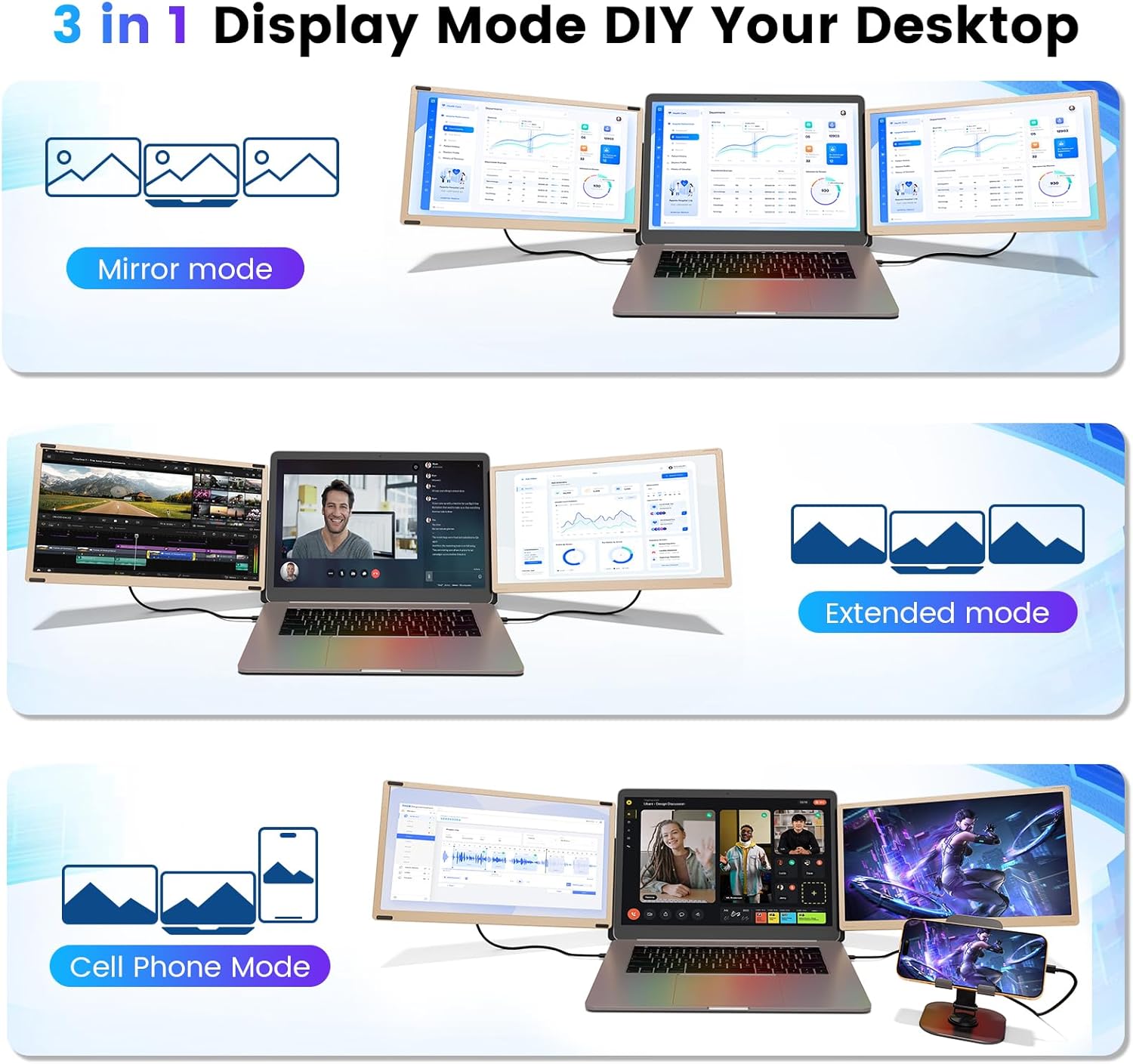
1 Mirror/Extend Mode 2 Phone/Game Mode 3 More Combinations


Connect the H5-T cable to the DP port of one of the screens
1 Method 1 2 Method 2 3 Method 3

Retractable design, custom length.
Built-in speakers, adjustable brightness & volume.

Adjustable stand with non-slip design, customized viewing angle, stable and portable.

Easy to fold and carry.

Brightness: Swipe left. Press and slide left&right.
Volume: Swipe right. Press and slide left&right.

You can quickly create your own personal laptop workstation anytime, anywhere.
1 Fit 13”-17.3” Laptop 2 90°&235° Adjustable 3 Magnetic Design 4 Custom Settings 5 Portable

Ideal for office meetings, remote workers, moviegoers, gamers, programmers


1 Office Meetings 2 Working From Home 3 Business Travel 4 Playing Games 5 Online Learning
15.6″ Laptop Screen Extender – Common Connection Problems & Solutions
Method 1 Make sure your laptop has 2 full-function TyÞe~Ç. Use 2 USB~Ç to USB~Ç cables. Plug into the ports marked TyÞe~Ç1/~Ç2 on the left and right screen extenders respectively. Method 2 Make sure your laptop has 1 full-function TyÞe~Ç. Use 1 USB~Ç to USB~Ç cable and plug it into the port marked TyÞe~Ç~C1/C2 on one screen extender. Use 1 USB~Ç to USB-A and 1 USB~Ç to HDMI cables and plug them into the ports marked TyÞe~Ç1/C2 and TyÞe~Ç to DP on the other screen extender respectively. Method 3 If there is no HDMI port. Make sure your laptop has 1 fully-functional USB~Ç, USB-A, and regular USB~Ç (or 2 USB-A ports). Download the driver. Connect the H5-T cable to the DP port of one of the screens, and use 1 USB~Ç to USB~Ç cable and 1 USB~Ç to USB-A cable to the ports labeled USB~Ç1 and USB~Ç2 on the other screen extender or an external adapter to power the screen. Full-function USB~Ç Port? If (Thunderbolt 3, Thunderbolt 4, DP 1.2), it means that the USB~Ç port can support power and video signals. (You can also check the laptop port parameters online) Only HDMI / USB-A Ports? You will need a H5-T hub (to provide the video signal) for the second monitor. Portable Monitor “No Signal” (1) If there is no signal when the USB~Ç to C cable is plugged in, you can plug in an additional USB-A to Ç (5V/2A) cable (some USB~C ports on laptops are not fully functional and only support power or video signals) (2) If there is no signal when the USB-A to C cable is plugged in, you can plug in an additional HDMI to miЙi HDMI cable. (3) If there is no signal when the HDMI to miЙi HDMI cable is plugged in, you can plug in an additional USB-A to Ç cable. The Monitor Doesn’t Light Up? Maybe your laptop is low on power. Please use an additional power supply that provides 5V/2A to charge the monitor. Or use a USB-A to USB~Ç cable to power the screen extender. And please activate your laptop screen and avoid putting the computer into sleep mode. Flickering and Black Screen? Because the laptop is low on power or voltage, try using an external 5V/2A adapter with a cable to power the monitor. How to Turn on the Screen? Please press and hold the “Power” button on the back for 3-5 seconds, and the indicator light changes from red to blue to indicate normal operation. And activate the laptop screen and control it in the display settings to avoid the computer entering sleep mode.
Laptop Screen Extender 15.6”
What You Get
15.6” Laptop Screen Extender*2
USB-A to USB~C*2、USB~C to USB~C*2、HDMI to USB~C、H5-T
Sleeve Stand、Single Screen Stand、Manual、Bag、Box
The video showcases the product in use.The video guides you through product setup.The video compares multiple products.The video shows the product being unpacked. Portable Triple Laptop Monitor Extender Merchant Video
How to Install?
Plug & Play, Easy to Use
It is a great choice for office meetings, home work and business travel, entertainment games.
The video showcases the product in use.The video guides you through product setup.The video compares multiple products.The video shows the product being unpacked. Plug & Play, Easy to Use Merchant Video
⭐ TRIPLE SCREEN DISPLAY, 300% WORK EFFICIENCY – Our 15.6-inch laptop monitor extender is suitable for 13″-17.3″ laptops. Support three modes: extended mode, mirror mode and second screen mode, easy to carry, fold or unfold. Perfect for conference presentations, multi-tasking, perfect multi-screen simultaneous and multi-screen independent display solution. You create a personal mobile workstation anytime, anywhere, increase your work efficiency by 300% and save your time.
💻 FULL HD 1080 IPS DISPLAY – 15.6 inch laptop monitor extender with 1920*1080P high resolution/300 nits brightness/1:1000 contrast/60HZ refresh rate/adjustable stand 235°/rotate 90°, providing you with rich colors and vivid visual experience. The portable dual laptop screen extender can independently adjust the brightness, speakers, enjoy a bright, immersive work and entertainment experience, with anti-glare and flicker-free functions, can provide eye protection.
📲 WIDE COMPATIBILITY – This triple laptop screen extender offers a worry-free plug-and-play experience and is compatible with a variety of devices and systems, including Windows, Mac, Android, Chrome, and Switch. Perfect for office meetings, home work, business travel, online meetings, financial workers, stock traders, gamers, designers, and anyone who needs a more efficient workflow. (Please make sure your laptop has a fully functional TyÞe ~Ç port)
✅ PLUG & PLAY, EASY TO USE – This laptop screen extender monitor portable is plug and play, no driver required. Please make sure your laptop (1) has 2 full-function USB~ Ç ports: please use the USB~ Ç to TyÞe~ Ç to connect 2 screen extenders. (2) has 1 full-function USB~ Ç port & 1 HDMI port: please use the USB~ Ç to TyÞe~ Ç to connect one screen, and use HDMI & another USB-A to TyÞe~ Ç to connect another screen, providing signal output and power for dual screen display.
💯 WORRY-FREE AFTER-SALES – Ultra-thin 15.6 inch alloy dual display with upgraded widened adjustable angle stand, providing better stability for laptop and screen. It is a great choice for office meetings, home work and business travel, entertainment games. Packing list: 2x Laptop Screen Extender, 2x USB-A to USB ~ C, 2x USB ~ C to USB ~ C, 1x HDMI to Typ~e ~ C, 1x H5-T, 2x Sleeve Brackets, 1x Single Screen Bracket, 1x Handbag, 1x Manual. Try it, you will enjoy efficient work!
User Reviews
Be the first to review “ALI SEA Laptop Screen Extender 15.6”, Portable Triple Monitor for Laptop up to 17.3″ with FHD 1080P IPS Display, Laptop Monitor Extender for Travel Plug-Play Compatible with Mac, Wins, Chrome”
Related Products


Original price was: $399.99.$299.99Current price is: $299.99.
There are no reviews yet.